Ocean MAP User Manual
Apple Watch Ultra underwater navigation · dive‑assist app — full feature setup & usage, safety indicators, and legal notices in one place.
01Getting Started
The first time you install and open the app, it walks you through:
- Language — English · 한국어 · 日本語 · 中文 · Español · Deutsch · Français (7 languages)
- Data consent — anonymous usage/diagnostics (PIPA/GDPR). Optional, changeable anytime.
- Onboarding — key features as slides. (Replay later via Menu › Guide)
- Legal notice — acknowledge it is an assist tool.
Touch is disabled underwater, so map the Ultra's orange Action button to the “Compass Action” shortcut to mark/confirm with a physical button underwater. (Watch Settings → Action Button → Shortcut → “Compass Action”)
02Home · 5‑way Dial
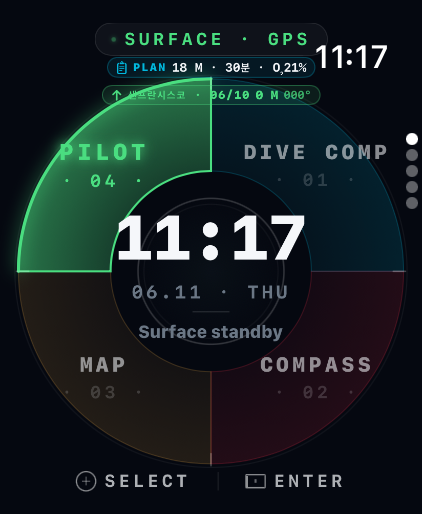
The surface standby screen — clock/date in the center, a dial around it. Turn the Digital Crown to select a mode, tap the center (hub) or push the bezel to enter.
| Position | Mode |
|---|---|
| 01 | 🟦 Dive Computer |
| 02 | 🧭 Compass Navigation |
| 03 | 🗺️ Digital Map |
| 04 | 🟢 Pilot (pre‑dive final check) |
| 05 (center) | 💧 START DIVE |
Turn the Crown to the 5th position and the center clock becomes a green “START DIVE” button. Tapping it starts the dive session and enters the three underwater pages. The bottom shows battery, No‑Fly, and Surface Interval (SI) timers.
03Dive Computer Setup
Everything is configured in one place — the PILOT screen. PILOT is the home dial's first focus, and its settings card holds all nine items (entry type · mode · nitrox · max depth · safety stop · ascent limit · water · depth zero · plan). Tap any row to edit it on the spot.
Settings
| Item | Description | Default |
|---|---|---|
| MODE | Scuba = NDL · safety stop · deco / Freedive = depth & time only | Scuba |
| Nitrox | Mix O₂%. Air = 21%. | 21% |
| Max Depth | Personal limit. Warning at −5 m, strong alert at limit | 40 m |
| Safety Stop | Stop time at 5 m; extra time/depth configurable | 3 min |
| Ascent Limit | Ascent‑rate warning threshold | 10 m/min |
| PLAN | Target depth & bottom time (shown on Home PLAN chip) | 18 m·30 min |
| Units / Water | m·ft / salt·fresh (pressure→depth correction) | m · salt |
| Depth Zero | Surface‑pressure calibration | Auto |
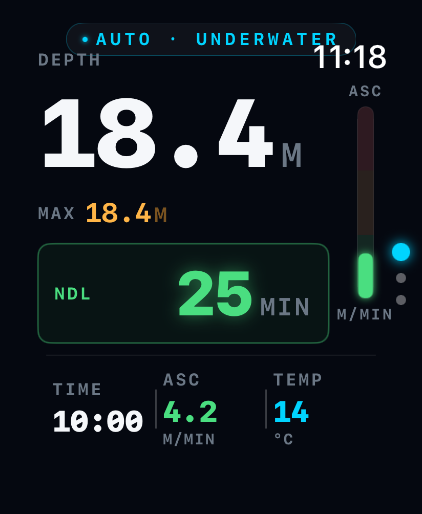
Underwater display (Scuba)
Depth · dive time · NDL · ascent rate · measured water temperature (Ultra temperature sensor) · safety-stop countdown. With nitrox, an EAN · MOD · CNS chip appears under the depth (hidden on air).
The app enforces the recreational limit of 40 m in code; anything beyond is always a critical alert. Deco is computed with Bühlmann ZHL‑16C and conservative GF 40/85. When NDL reaches 0 the app prescribes stop depth, time and TTS step by step (the time counts down live while you hold the stop); ascending above a stop triggers an immediate descend-now alert and the violation is recorded in the log. All values are reference-only and do not replace certified equipment.
04Compass Mode Setup
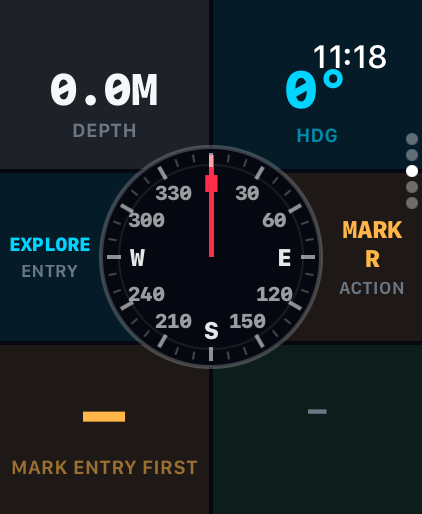
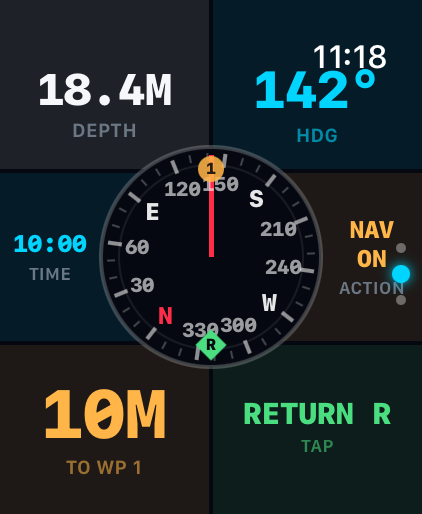
Where GPS can't reach underwater, sensor fusion (accelerometer, gyroscope, magnetometer, depth) estimates your path so you can return safely to the start.
Dive type (4)
| Type | Use |
|---|---|
| BEACH | Shore entry — return relative to the coastline |
| BOAT | Boat diving — return to the boat position |
| ISLAND | Island / terrain reference |
| EXPLORE | No bearing set — just track & draw your path (free roam) |
Five steps
- ① Mark start (R) — saves the entry point R (your return reference). Auto‑mark: whether you press START DIVE or just submerge, if no origin is set yet it is auto‑marked as R the moment you enter the water (including Explore / no setup).
- ② Waypoints — optional — Crown = distance, confirm with the Action button (or tap). Up to 9. Can be skipped.
- ③ Navigate — the dial rotates live with your heading. Put the orange target marker at the top (front) and swim forward. The current target number/marker (O) blinks inside the dial.
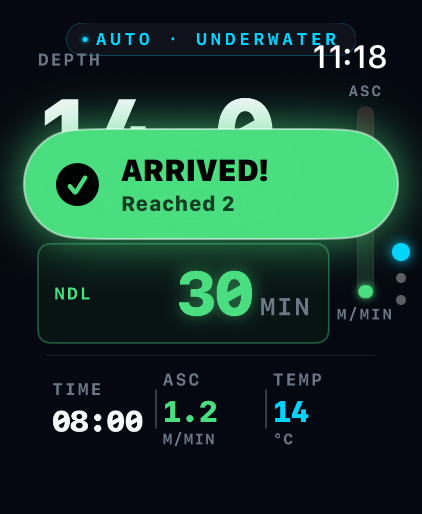
- ④ Arrival — within 3.5 m of the target: two strong taps + a green banner, and it auto‑advances to the next target (which then blinks).
- ⑤ Return (R) — press RETURN for live bearing & distance back to start R (the R marker is highlighted and blinks).
Touch is disabled underwater. Crown = adjust, Action button = confirm (mark / waypoint / toggle return).
05Digital Map
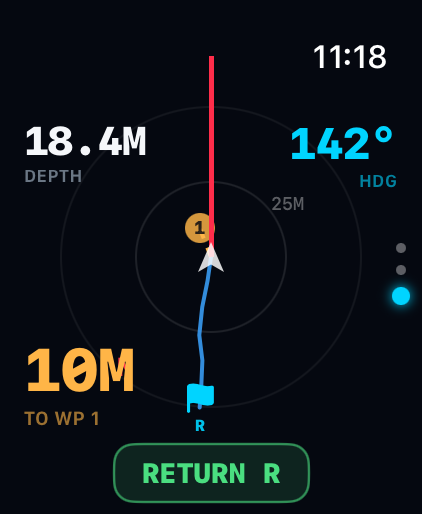
The underwater map rotates like a compass (heading-up) — your direction of travel is always up and your position (white triangle) stays centred. Line the dotted target line up with the red lubber line at the top and swim straight. (Works after you mark the start.)
- Start R — an icon per entry type (⛱ beach / ⛵ boat / 🌴 island / 🚩 explore). Blinks while returning
- Red N — marks north on the rotating map edge · range rings — auto-scaled distance feel
- 🔶 Waypoints (orange diamonds) — the current target blinks; passed ones dim
- Your position — blinking white triangle, always centred
- Trail — your actual swum path drawn as a cyan line (key for Explore mode)
- Planned path — start→WP order as a dashed line
- Off‑path indicator — a red line + deviation badge if you stray too far
- Top: heading (HDG) & depth (DEPTH), plus direction/distance to start or boat
06The 3 Underwater Modes
Entering
On the surface, press START DIVE and descend (Home center 5th, or the Pilot screen). This starts the dive session so the app stays active underwater. Plain submersion (auto‑detect) also works, but START DIVE is recommended.
Three operating pages (settings hidden)
| Page | Screen |
|---|---|
| 1 | 🟦 Dive Computer (depth · time · NDL · ascent) |
| 2 | 🧭 Compass (live navigation · target marker) |
| 3 | 🗺️ Digital Map (position · path · return) |
- Switch: turn the Digital Crown or swipe up/down (the page name flashes briefly)
- Display: lowering your wrist dims to system power-saving, but a black always-on dive view keeps depth, time, NDL and target updating every second. Raise your wrist for the full screen
- Touch: disabled by Water Lock → use Crown (adjust) + Action button (confirm)
- Exit: in PILOT preview use the top-left ‹ button; a real dive ends only by surfacing — no accidental exits underwater
- Surfacing: the dive ends automatically and a summary is shown
After surfacing, press and hold the Digital Crown to unlock and eject water from the speaker.
07Safety Indicators & Alerts
The app warns via haptics, sound, and on‑screen banners. (Underwater, mostly haptics due to Water Lock.)
| Alert | Condition | Indication |
|---|---|---|
| Fast ascent | > 10 m/min | Warning haptic + display |
| No‑deco limit (NDL) | NDL → 0 | Countdown, alert when near |
| Deco obligation (DECO) | NDL exhausted | Step-by-step stop depth · time · TTS (mandatory) — live countdown at the stop |
| Deco stop violation | Above the stop 10 s+ during deco | Descend-now alert + haptic every 5 s, logged + 24 h no-diving banner |
| MOD approach/exceeded | Nitrox MOD −3 m / exceeded | Warning → critical (chip cyan → amber → red) |
| CNS oxygen clock | NOAA limit 80% / 100% | Warning / critical + ascend instruction |
| Max‑depth warning | approaching limit −5 m | Warning |
| Over depth / 40 m | limit or 40 m hard ceiling | Critical alert |
| Safety stop | ~5 m on ascent | 3‑min countdown |
| Arrival | within 3.5 m of target | 2 strong taps + banner |
| Off‑path | deviation over threshold | Red line + distance badge |
| Battery | ≤30% (amber) / ≤15% (red) | Home warning |
| No‑Fly | post‑dive no‑fly time | Home countdown (red for deco dives) |
| Surface Interval | time since last dive | Home display |
| SOS | SOS triggered (or Action button) | Red full‑screen + strong haptic + position/bearing |
| Buddy check (BWRAF) | pre‑dive checklist | Menu › Buddy Check |
Plus: distance/bearing to boat or start on ascent, surface‑interval & no‑fly timers, automatic dive log + GPS site saving.
The compass won't work on a magnetic charger (magnetic interference). Remove it from the charger before use/testing.
08Legal & Disclaimer
Nature — an assist tool
- Ocean MAP is a backup (assist) tool, not a replacement for a certified dive computer.
- It is not certified to EN 13319 or any diving‑equipment standard.
- All values (depth, time, NDL, deco, bearing, distance, etc.) are for reference only and may be inaccurate due to sensor error, environment, or device state.
Safety responsibility
- Always dive with a certified primary dive computer/gauge, certified gear, and a buddy.
- Ascend slowly (recommended ≤ 9–10 m/min), observe safety stops, and dive within your certification and limits.
- Deco is an estimate (Bühlmann ZHL‑16C + conservative GF 40/85). Follow certified equipment and dive practice for actual deco obligations.
- Primary emergency response is always trained procedure and certified equipment; the app's SOS/alerts are supplementary.
Disclaimer
- The developer/distributor is not liable for any direct, indirect, or incidental damage, injury, or death arising from use or inability to use the app. Diving is inherently risky; all risk and judgment rest with the user.
- The app is not a medical device and provides no medical diagnosis, treatment, or advice.
Privacy · Data
- Location (GPS): used only to save dive‑site coordinates and aid return (off underwater).
- Motion sensors: accelerometer/gyro/magnetometer/depth used for on‑device EKF path estimation.
- Health (HealthKit): only if permitted, records completed dives as Apple Health underwater‑diving workouts (time · max depth).
- Anonymous usage/diagnostics: collected only with consent (PIPA/GDPR) and revocable anytime in settings. Personal data is never sent off without consent.
By using the app, you confirm you have read and understood these notices and disclaimers, and agree to use it solely as an assist tool alongside certified equipment, at your own responsibility.